
The charging process for a charging pile is designed based on the operational requirements of the charging pile. The main program flow for the charging pile is shown in the figure below. After the device is powered on, the charging pile control system program begins initializing the device and then tests it. If the device tests normally, it enters operational mode and awaits user access.

To begin charging, the user first plugs in the charger. The screen then jumps to the start-up method selection page. The user can select from three methods: remote start by scanning a QR code, remote start by swiping a card, or remote start by charging password.
When using a QR code, the user scans the QR code on the screen with their phone. The phone jumps to the user interface, completes payment, and the server sends a remote start command via the cloud, which then begins the charging process. If charging is to be stopped during the charging process, the remote control can be performed directly on the phone.
Before swiping a card or starting with a charging password, the user must select a start-up mode. Available options include automatic full charge, by battery level, by amount, and by time. After selecting the correct amount, charge level, or time, the user swipes their card or enters their password to start charging. When the set charge amount, charge level, or charge time is reached, charging automatically stops, and the checkout process begins. Users can also swipe their card or enter their password to stop charging in advance.
During the charging process, if any abnormality occurs, such as overvoltage, undervoltage, or overcurrent, charging will immediately stop to protect both the vehicle and the charging equipment.
RFID User Authentication Function
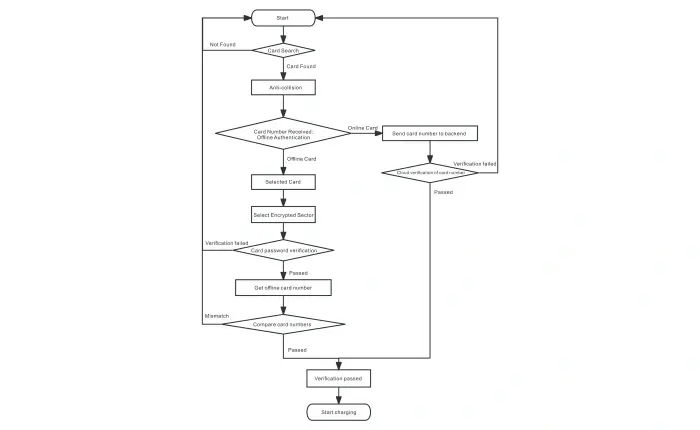
RFID user authentication requires card authentication in two scenarios. Card authentication requires card discovery via SI512 and anti-collision processing. The card number obtained at this point can be used for online card authentication. For offline card authentication, the user selects the card and selects the corresponding encrypted sector for card password verification. The offline card number stored in the sector is then read and compared with the card number stored on the charging station. If they match, authentication succeeds; otherwise, authentication fails.
Network Function
The connection between the charging station and the cloud platform relies on the Internet. The design offers three network connection options: a wired connection and two wireless connections. The wired connection uses Ethernet, communicating through a router; the two wireless connections are implemented via Wi-Fi or 4G Cat-1, respectively.
To enable server connection via any of the three networks, the functionality of the three networks can be consolidated into a single library. Ethernet implements TCP client functionality via the manufacturer’s SPI-based driver library, while Wi-Fi and 4G Cat-1 modules implement TCP client functionality via AT commands.
To facilitate charging station operation, the TCP client functionality enables the implementation of various cloud platform protocols for communication with the backend. For example, OCPP1.6 uses the JSON data format based on the WebSockets protocol, while the Cloud Fast Charge protocol is implemented based on the APCI format (Application Protocol Control Information).
